Measuring
To create a panorama image from different images taken from a common center point, the orientatiobs of the images have to be known among other camera properties. The necessary data can be derived from independent calibration and screenshots during the on-board panorama program.
To simplify the process, this command can be used to capture images with the necessary metadata automatically being recorded as reported by the instrument.
Requirements
GeoCOM capable robotic total station with overview camera and imaging license
Positions
The program takes images in a region defined by a horizontal and vertical angle range. Two convenience settings exists (in addition to the default), that reduce the number of angle inputs needed for specific cases:
region: horizontal and vertical range is required (this is the default)
strip: 360 degree horizontal coverage with given vertical range
sphere: complete spherical panorama
Note
The complete sphere panorama is not very practical, and more of a proof of concept, as capturing the full view takes impractically long time.
If adaptive FoV is enabled for the position layout generation, images that are taken at angles that deviate from the horizontal position are considered to cover a wider horizontal angle area. To avoid taking unnecessary images, the top and bottom rows have fewer images.
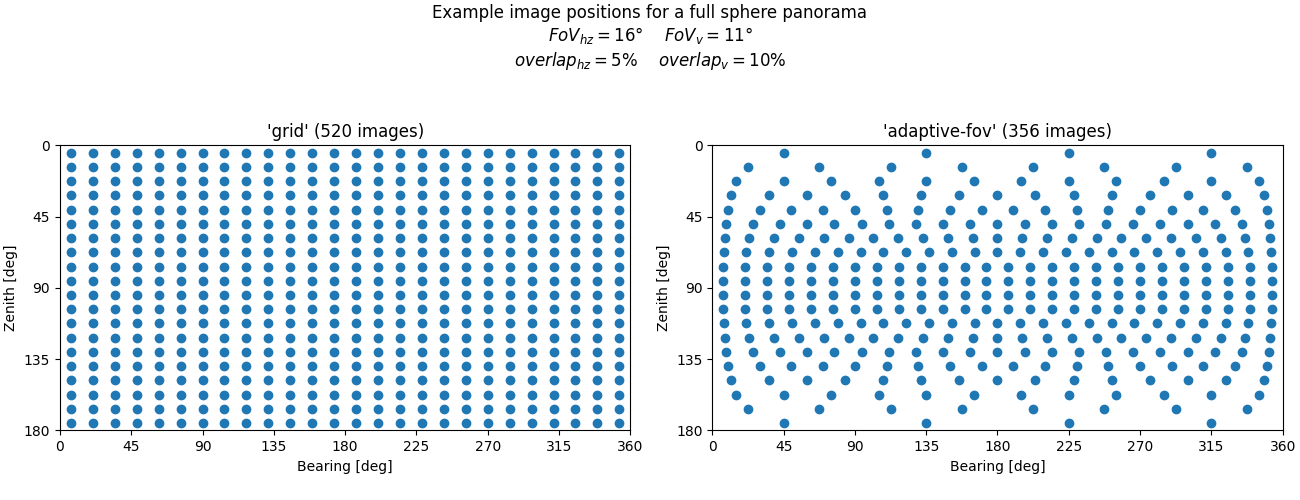
To reduce the parallax errors of close range objects caused by the camera offset, it is possible to increase the overlap between images (effectively reducing the motion between images), but this can significantly increase the required number of images and time (e.g. full sphere panorama with 30% overlap requires approximately 1500 images).
Examples
iman capture panorama COM1 metadata.json
iman capture panorama --shape sphere --prefix panosphere_ COM1 metadata.json
iman capture panorama --strip strip --vertical 70-00-00 110-00-00 COM1 metadata.json
Usage
iman capture panorama
Take pictures with the overview camera of a total station for later panoramic processing.
The angular area to cover can be set in the command line, or recorded with the instrument at the start of the program. To use the point annotation feature during later processing, the instrument should be properly set up and oriented in the local coordinate system when running this program.
The acquisition positions are calculated, so that there is at least 5% overlap between images in a row, and 10% overlap between rows. When the defined panorama area covers the full range (360 degrees horiztal and/or 180 degrees vertical) the overlap will be usually larger, otherwise the program will opt to capture a slightly wider/taller area to keep the overlap close to the nominal values. The default position layout take into account, that images taken farther from horizon cover more and more horizontal area.
The metadata required for later processing is saved on the controlling computer, the images themselves have to be downloaded from the instrument. The images are typically saved to the SD card (if available), in the ‘Data/Geocom/Images/Wide-angle’ directory.
Time required for the whole process mainly depends on the number of images, which in turn is dependent on the acquisition area. A full sphere panorama at 1x zoom on a non-piezo motorized instrument takes around 25-30 minutes to capture with around 350 images. New instruments with piezo motors might be faster, but the main limiting factor is the camera, not the motors.
Enabling increased positioning tolerances might sligtly reduce the time, but if an unexpected error occurs, the program might not be able to restore the original tolerances, so USE WITH CAUTION.
This command requires a GeoCOM capable robotic total station with overview camera imaging functions.
iman capture panorama [OPTIONS] PORT METADATA
Options
- -b, --baud <baud>
Serial speed
- Options:
1200 | 2400 | 4800 | 9600 | 19200 | 38400 | 56000 | 57600 | 115200 | 230400 | 921600
- -t, --timeout <timeout>
Serial timeout
- -a, --attempts <attempts>
Number of connection attempts
- --sync-after-timeout
Attempt to synchronize message que after a timeout
- --prefix <prefix>
Image prefix before number
- --whitebalance <whitebalance>
Set white balance mode for the capture (mode is reset to auto after the program is finished)
- Options:
auto | indoor | outdoor
- --increase-tolerance
Increase the positioning tolerances for the duration of the program. USE WITH CAUTION!
- --overlap <overlap>
Overlap between images within a row, and overlap between rows (percentage)
- --horizontal <horizontal>
Horizontal start (left) and end (right) bearing
- --vertical <vertical>
Vertical start (top) and end (bottom) zenith angle
Arguments
- PORT
Required argument
Serial port that the instrument is connected to (must be a valid identifier like COM1 or /dev/usbtty0)
- METADATA
Required argument
File to write image metadata to