Measurement
Once the target definition JSON is created, the measurement sets can be started. In each measurement session the time, internal temperature and battery level are recorded at start. For each target the horizontal angle, zenith angle and slope distance are recorded.
Requirements
Target definition file (see the Targets application)
GeoCOM capable robotic total station with ATR
Order
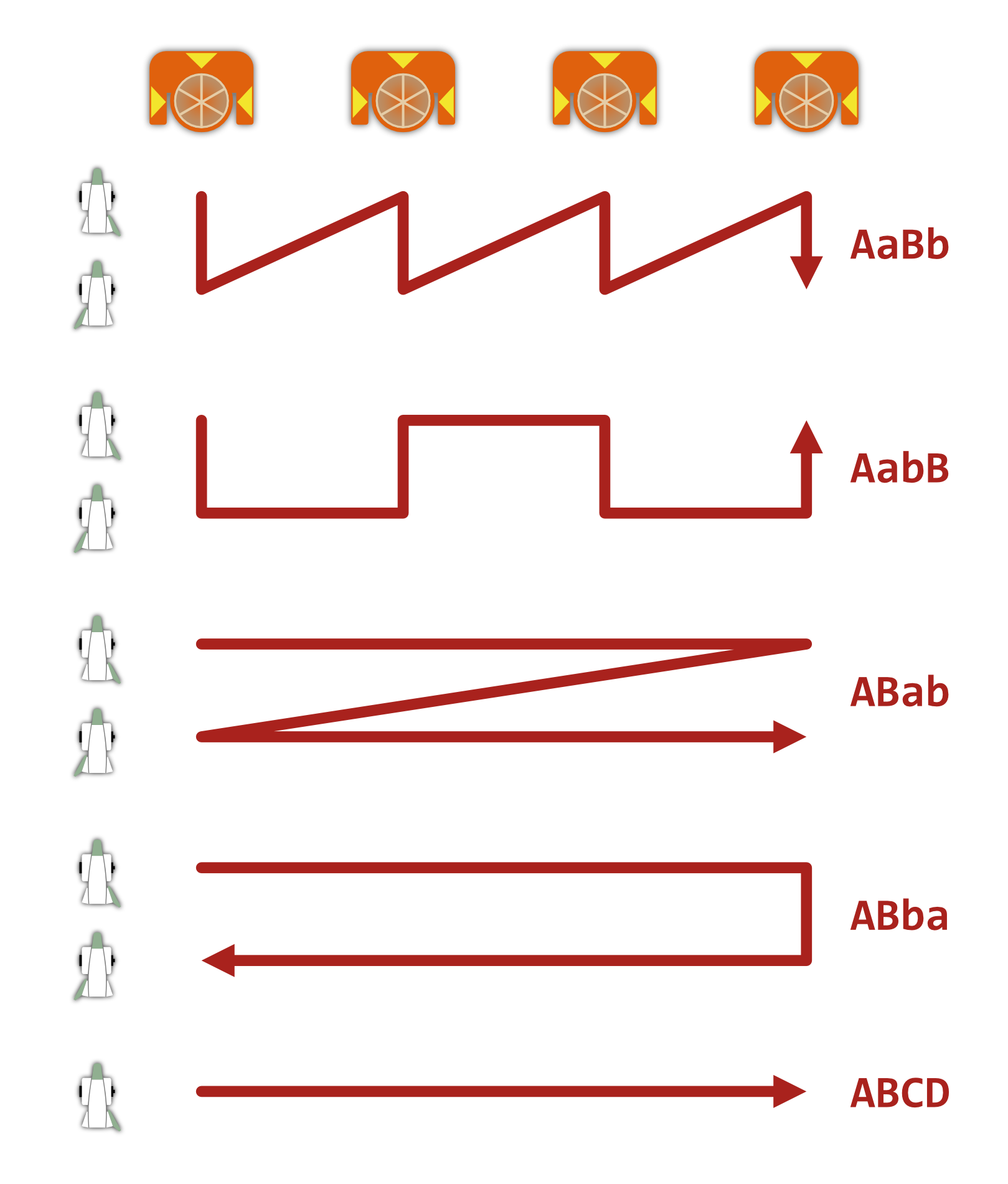
The measurement order can have a significant effect on the time it takes to
complete a full cycle. The fastest order of face 1-2 measurement pairs is
ABba or ABab, that involve the smallest number of face changes. Other
orders might be benefitial if the targets cannot be occupied for the duration
of the full cycle. The figure below illustrates the different supported
measurement patterns. The default order is ABba.
Note
The measurement order has the most significant effect on overall cycle duration with older instruments, where the switch between two faces usuallay takes around 5-6 seconds. These small intervals can add up over long sets or surveys.
Results
The results from each session are saved into a separate JSON file. These can be later merged for processing if necessary.
Scheduling
Periodic measurement sessions can be echieved by settings up a scheduled task in the scheduler tool of the respective operating system of the controlling computer (e.g. Task Scheduler on Windows, crontab on Linux).
Examples
iman measure set -r 3 --sync-after-timeout COM3 targets.json set.json
iman measure set -p P1 -p P2 -p P8 COM3 targets.json set.json
iman measure set -o ABCD COM3 targets.json set.json
iman measure set COM3 targets.json "set_{date}_{time}.json"
Usage
iman measure set
Run sets of measurements to predefined targets.
The target coordinates are loaded from the specified target definition file. The total station aims at the target coordinates (fine adjusting with ATR) and takes polar measurements in the given order.
The measurement results are saved in a JSON format for later processing.
This command requires a GeoCOM capable robotic total station, that has ATR.
iman measure set [OPTIONS] PORT TARGETS OUTPUT
Options
- -b, --baud <baud>
Serial speed
- Options:
1200 | 2400 | 4800 | 9600 | 19200 | 38400 | 56000 | 57600 | 115200 | 230400 | 921600
- -t, --timeout <timeout>
Serial timeout
- -a, --attempts <attempts>
Number of connection attempts
- --sync-after-timeout
Attempt to synchronize message que after a timeout
- --dateformat <dateformat>
Date format as accepted by strftime
- --timeformat <timeformat>
Time format as accepted by strftime
- -c, --cycles <cycles>
Number of measurement cycles
- -o, --order <order>
Measurement order (capital letter: face 1, lower case: face 2)
- Options:
AaBb | AabB | ABab | ABba | ABCD
- -s, --sync-time
Synchronize instrument time and date with the computer
- -p, --point <points>
Target to use from loaded target definition (set multiple times to use specific points, leave unset to use all)
Arguments
- PORT
Required argument
Serial port that the instrument is connected to (must be a valid identifier like COM1 or /dev/usbtty0)
- TARGETS
Required argument
JSON file containing target definitions
- OUTPUT
Required argument
Output file path or path template with placeholders (‘{date}’, ‘{time}’, ‘{order}’, ‘{cycles}’)